The PADS4 Agent application fully supports PADS4 installations that, besides a central main server, also include sub-servers or backup servers. Sub-servers and/or backup servers are typically used by large or mission-critical PADS4 installations. In this case, each sub-server will handle a subset of the total number of PADS4 Viewers to reduce the system load on the main server and minimize network traffic. In the same way, a backup server can be used as a fallback mechanism for the main server or a sub-server.In a PADS4 installation with multiple servers, you usually use the PADS4 Agent to connect to the main server of the system and from there monitor and remotely manage the entire installation. However, you can also connect directly to any sub-server of the installation. From any sub-server, you also have access to the entire system, unless your system administrator has granted you limited access by defining specific permissions in PADS4 System Management.
Please note that there is a difference between working with a PADS4 installation that consists of multiple servers and connecting to multiple servers. The way of working described in this topic is intended for working with multiple servers within the same PADS4 installation. The procedure to connect to multiple servers is mainly intended to work with multiple PADS4 Servers of different PADS4 installations and has been described by Connecting to multiple servers.
Using the navigation pane for a PADS4 installation with multiple servers
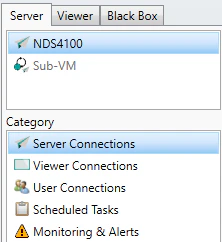
After you have successfully connected to one of the PADS4 Servers of your multi-server installation, you can use the navigation pane to select an information category and get access to the many built-in server functions or viewer functions of the PADS4 Agent application.To select an information category of a PADS4 Server:
Click on the Server tab in the navigation pane.
Select the Server, sub-server, or backup server for which you want to view the information.If a server is not accessible from the PADS4 Server you are connected to, then the server is disabled in the list of servers.
Click a Category in the list of available server information categories.
After this, the system will automatically retrieve the requested information from the selected PADS4 Server and display the results in the information area of the main window.
If you have selected Server connections, Viewer connections, Scheduled tasks or Content library as server information category then the system will always show the global results of your entire PADS4 installation, no matter what server you have selected.
Assistant
Responses are generated using AI and may contain mistakes.