> ## Documentation Index
> Fetch the complete documentation index at: https://docs.pads4.com/llms.txt
> Use this file to discover all available pages before exploring further.
# Favourite rooms and desks
> Mark the rooms, meeting spaces, and desks you use most often as favourites in PADS4 Workspace so they appear at the top of your search list.
The Favourite Room function gives you quick access to the rooms and desks you use most — for example, the meeting room next to your desk or your preferred workstation. You can mark as many rooms and desks as you like.
## Mark a room or desk as favourite
1. Search for the room or desk you want to favourite.
2. Hover over the result. A white star appears next to it.
3. Select the star. It turns yellow, and the room or desk moves to the top of your list, ready to book.
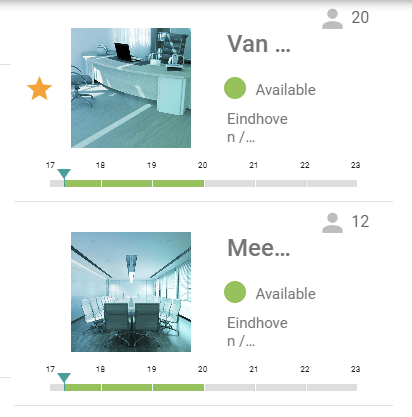 To remove a favourite, select the yellow star again. The star turns white and the room or desk returns to its normal position in the list.
Favourite Rooms will be shown as the first Bookable Room in the available spaces overview in the PADS4 Workspace user interface.
To remove a favourite, select the yellow star again. The star turns white and the room or desk returns to its normal position in the list.
Favourite Rooms will be shown as the first Bookable Room in the available spaces overview in the PADS4 Workspace user interface.